Angle
|
Click on a point to view it's explanation
|
Explanation of Points
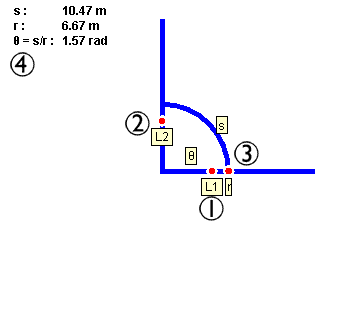
- Leg 1
Move this point to adjust the starting angle of the arc extent.
- Leg 2
Move this point to adjust the ending angle of the arc extent.
- Radius
Move this point to increase and decrease the radius of the arc.
- Info
These values show the properties of the angle and arc.
Note: Right-clicking (cmd-click on Mac) anywhere on the applet will bring up
a pop up menu that contains controls for this applet.
Reset 
Clicking this button will reset the experiment to its original starting
state.
Help 
Clicking this button will bring up this help page.
view image
Edited by Jeremiah
Van Oosten on
Monday June 04, 2001 02:17:58 PM